Start a cost plan in minutes. Let the people who do the work estimate their part. See buffer or overrun the moment it happens, and give Finance a forecast they can trust. No spreadsheet chasing, no extra servers.
Standard SharePoint package (.sppkg) • One-click setup • No external servers or data egress • English & German
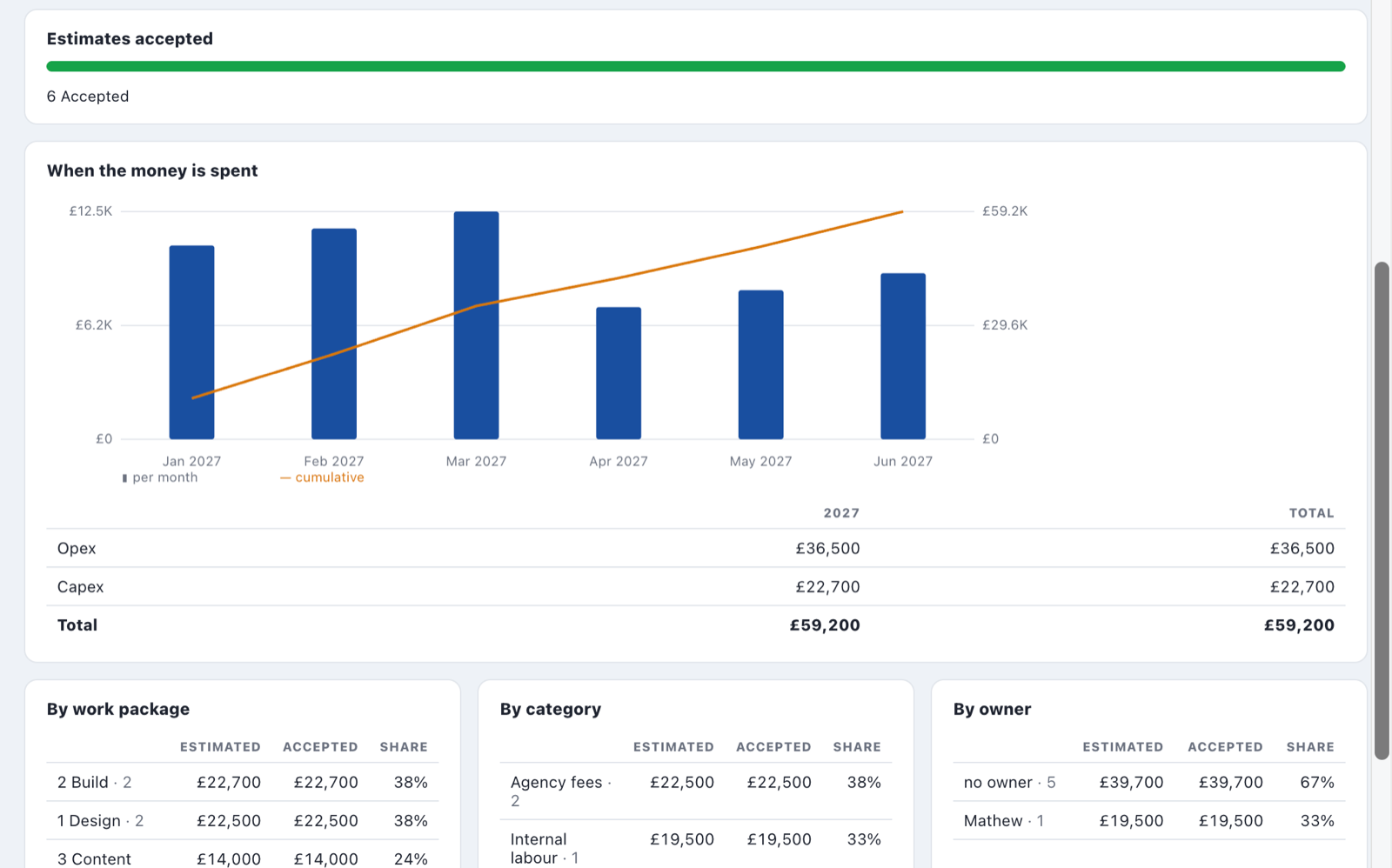
Every owner's estimate rolls up into one budget, by month, fiscal year, Opex/Capex, work package and owner.
We are partnering with project leaders, PMOs, and cost managers to refine Budget Planner in real-world Microsoft 365 environments. In exchange for your feedback and use cases, early adopters receive full access with zero license fees.
No complicated administrator setup, no steep learning curve. Every screen tells you the next step.
Choose Quick start to go straight to the cost plan, or the full lifecycle across Idea, Planning, Execution, and Closing. Paste your cost items directly from Excel or clone from past project templates.
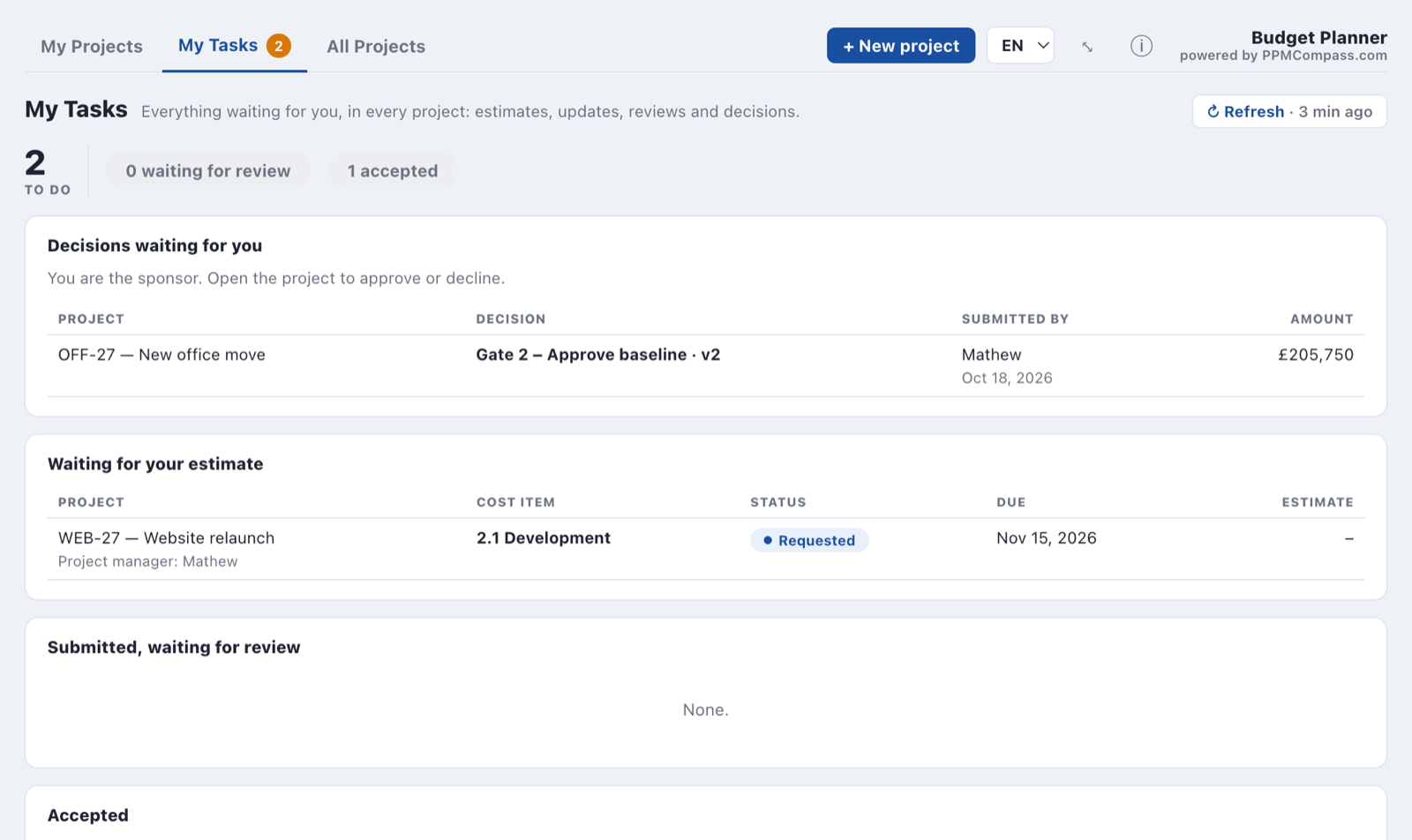
Give each item an owner and request estimates in one click. Owners find their work in My Tasks, estimate with quotes, unit rates, day rates or PERT ranges, and you accept, adjust, or return.
Approve the budget baseline, then keep it current with ten-second updates. Buffer or overrun shows at once, and a forecast for Finance is one click away.
This interactive demo runs directly in your browser with sample data and shows how project cost governance works in Microsoft 365.
Test 6 pre-configured projects (IT rollout, medical device, warehouse construction, office move). Switch roles between Project Manager, Cost Owner, and Sponsor in the top bar.
No sales presentation or login required. Download the complete User Manual (PDF) ↗
Want to run it in your own tenant? to receive the SPFx package.
Two simple choices per project. Adjust them whenever project scope evolves.
For smaller projects: straight to the cost plan, light approvals, and no sponsor needed. You approve the budget yourself.
For larger initiatives: structured progression across Idea, Planning, Execution, and Closing with sponsor baseline commitment.
Owners report spent so far and still to spend when their months end. Update tasks appear automatically.
Actuals live in your corporate finance system? Owners just keep their plan current when you ask, and give the final cost when an item is done.
A budget matures with the project. Budget Planner asks only for what each stage needs, and shows only the screens that matter now.
A few lines with accuracy bands and uncertainty cones, plus what planning will cost. Sponsor approves to plan.
Work packages and cost items estimated by their owners, spread over calendar months, with a contingency you can explain.
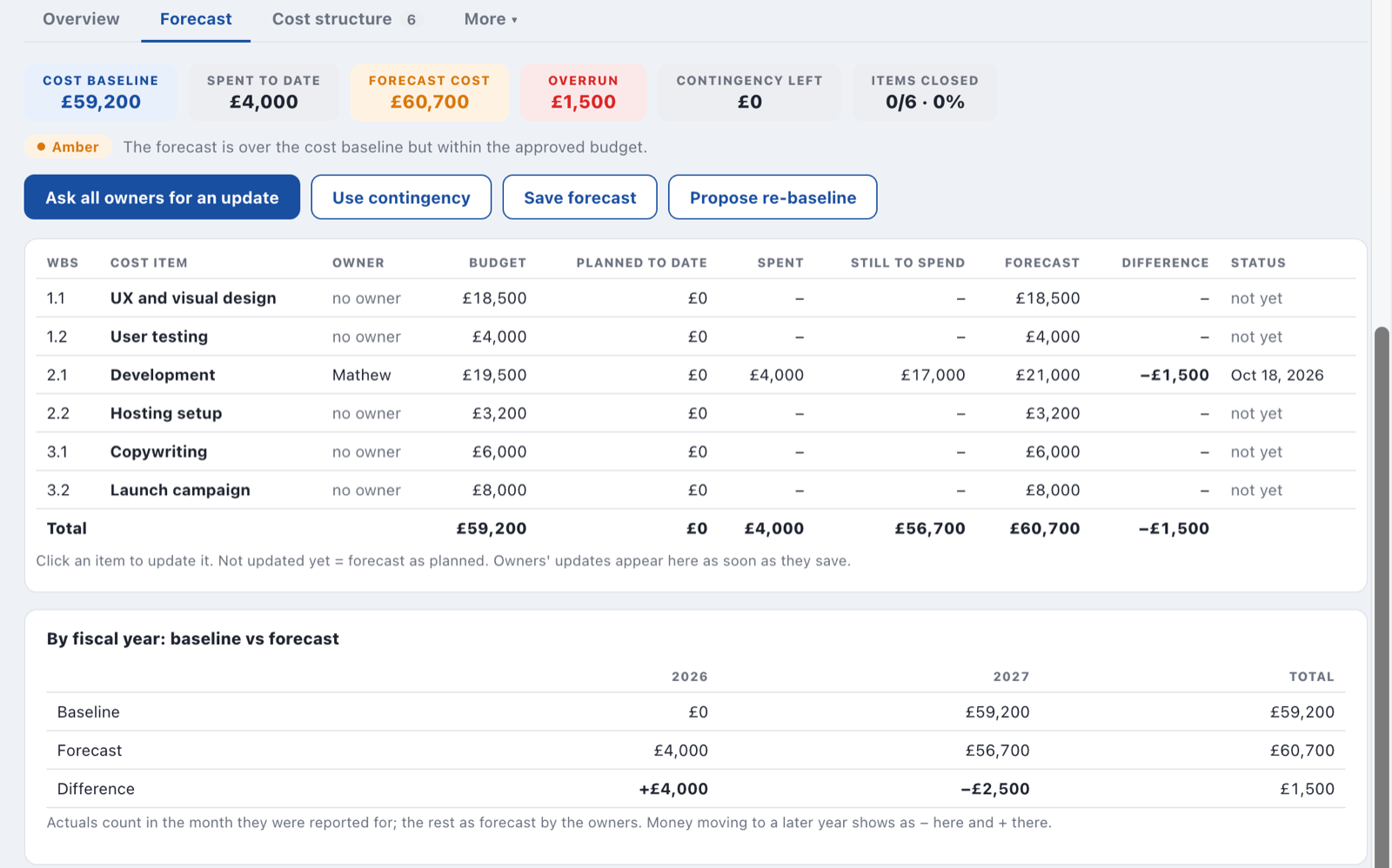
Green, amber, or red at a glance. Overruns come with a reason. Forecasts and re-baselines go to the sponsor for approval.
Final cost reconciled against earlier estimates, contingency used and released, and lessons captured for the next project.
Most budget tools fail because people stop updating them. Budget Planner keeps the work small and puts it where people look.
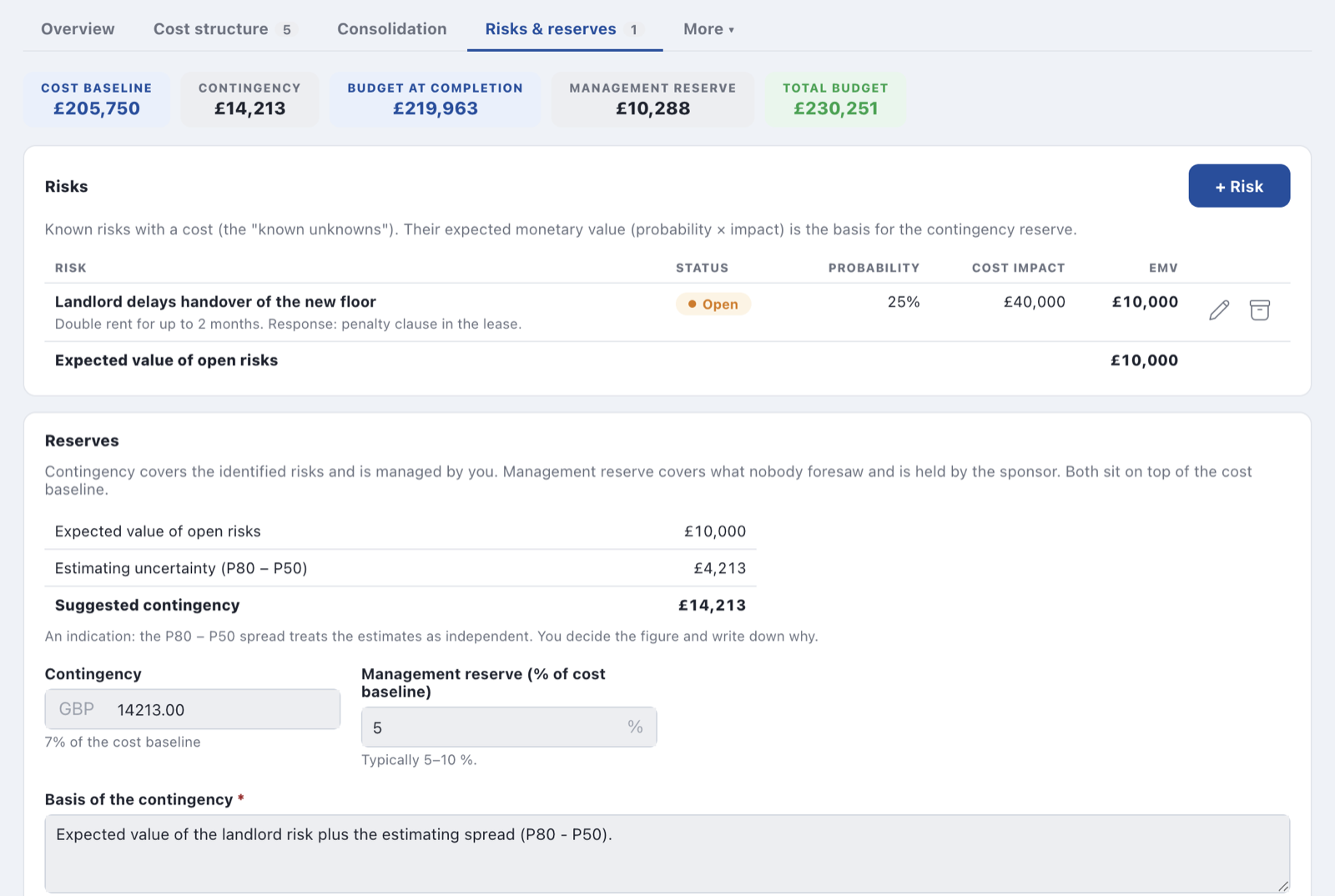
Instead of an arbitrary flat percentage, Budget Planner suggests mathematically sound contingency from the quantified risks you listed and how uncertain each estimate is. You decide the figure and record the written rationale.
During execution, project managers need to know immediately if spend is drifting. Cost owners provide rapid updates, and when costs change, Budget Planner highlights the variance, tracks contingency impact, and keeps Finance aligned.
Built from years of practical delivery experience, not theoretical textbook assumptions.
Paste your work packages and cost items with WBS numbers, categories and Opex/Capex. Add custom cost categories. Start new projects from past ones.
Save forecasts as versions, secure baseline approvals, and send key figures to Finance from your own mail. Print a one-page summary pack as PDF.
One comprehensive workbook with Summary, monthly Cost Structure, Risks, Assumptions, Rates, Versions and the complete Budget Log.
Every approval snapshot and forecast is preserved. Compare any two versions side-by-side by category to see exactly why the budget moved.
At close-out, see how accurate each estimate was and record lessons learned. Finished projects become reference templates for future projects.
Data stays in SharePoint lists on your site. No external servers, no extra API permissions, and no delete rights needed.
Everything you need to know about Budget Planner and the early adopter program.
Organizations that join during our early adopter window receive full access to Budget Planner without license fees. In return, we ask for your feedback and real-world use cases as we shape ongoing development. Contact us to receive the package.
No. With Quick start you go straight to the cost plan and, without a sponsor, approve the budget yourself. Use the full lifecycle across Idea, Planning, Execution, and Closing for larger projects that require formal baseline commitments.
Only if you want them to. With Plan only mode, owners keep their plan current when you ask and give the final cost when an item is finished. Your actuals stay managed in your external finance or ERP system.
It is a standard SharePoint Framework package (.sppkg). Your Microsoft 365 administrator uploads it to the App Catalog and adds it to any target site. A site owner then sets up its lists with one click. It works on any modern SharePoint site.
No. It runs 100% clientside in the browser and stores everything in SharePoint lists on your own site. It calls no external servers, APIs, or analytics tracking services.
Yes. Budget Planner features a strict "no delete" architecture: removing an entry marks it obsolete and preserves its full audit history, so team members can work safely with restricted permissions.
Budget Planner is a standalone app focused on single-project financial lifecycle management. PPM Compass 360 provides multi-project portfolio health, milestone trend analysis, strategic alignment, and steering reviews. Both run natively in Microsoft 365.
Join the early adopter program today. We will email you the package (.sppkg), setup guide, and sample project data. A demo project is built in, one click from the home page.